




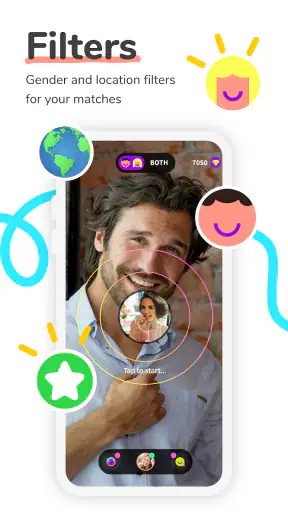

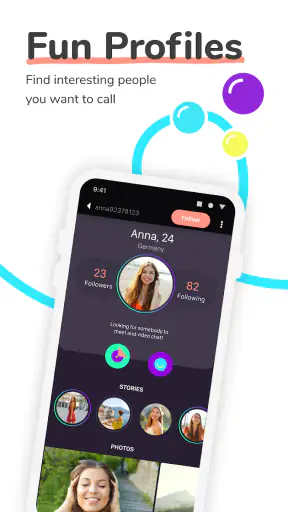
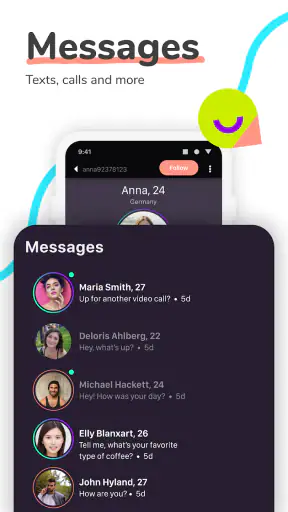
Meeting someone new through a live camera can be exciting, but it can also become frustrating when the first conversation does not start smoothly. That is the space Peachat - Live Video Chat tries to fill. It is a free social app from Peachat Video Chat Apps, built around random video conversations rather than carefully planned introductions. I found its appeal easy to understand: you can open it when you have a few spare minutes, appear in front of another person, and see whether a brief exchange turns into a genuine connection.
My overall experience is that the app is best approached as spontaneous social browsing, not as a replacement for a close-friends messenger or a serious dating service. The random format creates pleasant surprises, but it also means that patience, privacy awareness, and a willingness to move on quickly matter more than they would in a conventional chat app. It is free to install, although in-app purchases range from $0.99 to $134.99 per item, so I would explore the basic experience before spending anything.
Where the first conversations tend to get stuck
The biggest source of friction is the nature of random video itself. You are not choosing a carefully written profile and arranging a conversation with someone whose interests you already understand. The person on the other side may be shy, distracted, unable to hear you clearly, or simply uninterested in continuing. A failed connection does not automatically mean the app is broken.
I recommend treating the first few interactions as a quick screening process. Keep your opening friendly and simple, give the other person a moment to respond, and avoid sharing personal details immediately. If the exchange feels uncomfortable, ending it is a sensible use of the app’s format, not a failure. The same low-commitment design that makes Peachat approachable also makes conversations disposable.
Another common sticking point is expectation. Someone looking for a structured community, topic-based rooms, or a reliable list of known contacts may find the random approach too unpredictable. Peachat is more suitable when you want an unscripted encounter. If your priority is staying in touch with family, coordinating a group, or having a dependable video call, a conventional messenger or established video meeting service will usually be the better tool.
The mature audience label is important here. The app is rated for people aged 17 and over, so I would not treat it as a casual children’s chat space. Parents looking for a controlled environment for younger users should skip it. Adults should still use ordinary online safety habits: keep identifying information private, be cautious about moving a conversation elsewhere, and leave immediately when someone ignores a boundary.
What to do when a match is silent or unsuitable
Random matching rewards quick decisions. I found it more useful to judge the quality of an interaction within a short opening exchange than to force a conversation that clearly has no energy. A neutral greeting, a question about the person’s day, or a light comment about the moment is enough to test whether both sides want to participate.
Do not interpret every abrupt ending as a technical problem. People close apps, lose interest, or use random chat precisely because they want brief contact. The practical advantage is that you can try again without investing a long time in an unproductive conversation. The trade-off is that meaningful connections may require several ordinary or awkward attempts before one feels natural.
Video also makes presentation matter more than it does in text chat. Before starting, I would check whether your face is visible, whether the camera angle is comfortable, and whether background distractions are under control. You do not need a polished setup, but a quiet corner and clear lighting make it easier for another person to decide to stay.
Setup checks that prevent avoidable problems
Peachat supports devices running Android 6.0 or later, which covers a broad range of phones. Before blaming the app, I would confirm that the phone is using a compatible operating system and that the application has finished installing properly. The current version is 2.6.0, so keeping the installation current is a sensible first check when an older phone behaves differently from expectations.
Camera and microphone access are central to a live video chat, so a blocked permission can look like a broken connection. If you see a blank camera view or the other person cannot hear you, check the app’s permissions in the phone settings and make sure the relevant access is enabled. After changing a permission, close and reopen the app rather than assuming the change will be applied instantly.
Connection quality is just as important. A weak mobile signal, crowded public Wi-Fi, or a phone switching between networks can interrupt a video exchange. I get more reliable results by starting from a stable connection, pausing large downloads, and avoiding a location where the signal repeatedly drops. If the app works normally on one network but not another, the network is a stronger suspect than the account or installation.
It is also worth checking the simpler things people often overlook. Make sure the phone is not in a mode that blocks microphone access, confirm that another application is not actively using the camera, and close unnecessary apps if the device is struggling. A phone with very little free storage or heavy background activity may open the app but still deliver a poor video experience.
A calmer first-use routine
My preferred setup routine is deliberately short. I install the app, review the access prompts instead of tapping through them automatically, test the front camera, and begin from a private place with a stable connection. I also decide in advance what information I will not share. That small boundary-setting step matters more in random video chat than it does in a familiar social network.
Do not purchase anything during the first few minutes simply because a conversation feels promising. The app is free to start, and the available purchases can be expensive at the upper end. I would first learn how matching and conversation flow feel for you, then decide whether any optional spending genuinely improves your experience. A friendly exchange should not pressure you into paying.
A useful practical tip is to use headphones when your surroundings are noisy, provided they do not interfere with the microphone. This can reduce echo and make speech easier to follow. If the other person still cannot hear you, switch back to the phone’s built-in microphone briefly; the accessory, rather than Peachat, may be the source of the problem.
Recovering when a conversation or session goes wrong
When a video conversation freezes, I would start with the least disruptive fix: wait briefly to see whether the connection recovers, then leave and begin a new interaction. Random video chat does not require you to rescue every session. Repeatedly tapping buttons while the network is unstable can make the situation feel worse and may create duplicate actions.
If the app becomes unresponsive, close it completely and reopen it. If that does not help, restart the phone and test the connection in another location. These steps sound basic, but they separate temporary device or network trouble from a repeatable application issue. I would only consider reinstalling after checking the operating system, connection, permissions, and available storage.
Reinstalling can be useful when an update or installation has become corrupted, but it should not be the first reaction to one failed match. Save any information you need before removing an app, and remember that a reinstall may reset local settings. If the same failure continues across a stable connection and a clean restart, recording exactly what happened is more useful than repeatedly trying random fixes.
There is a second kind of recovery: getting back to a comfortable social experience after an unpleasant interaction. End the conversation, take a break, and do not argue with someone who is being rude. Random video apps work best when you use the skip-or-leave mindset instead of treating every match as a commitment. That is one of the most important workflow differences between Peachat and a normal contact-based messenger.
How to make short sessions more worthwhile
I would use Peachat in defined windows rather than leaving it open indefinitely. For example, after finishing work or while waiting for an appointment, a short session can provide a few spontaneous conversations without taking over the evening. This approach limits fatigue and makes it easier to stop when interactions become repetitive.
Another useful habit is to decide what kind of conversation you want before opening the app. If you are tired, you may prefer a quick hello rather than a long personal discussion. If you feel social, you can ask open questions and give a conversation more time. The app cannot guarantee a particular type of person or exchange, so controlling your own expectations is the closest thing to a reliable workflow.
For privacy, avoid showing documents, screens, addresses, workplace details, or recognizable private locations in the background. Video reveals more than text, sometimes unintentionally. I would also be cautious about accepting requests to continue elsewhere, especially if the other person becomes insistent. The ability to meet strangers is the central attraction here, but it is also the reason you should keep control of what the camera reveals.
When the app is not the cause of the problem
Not every poor experience points to Peachat. A phone with a damaged camera, a muted microphone, aggressive battery management, or a congested network can produce the same symptoms as an application fault. If other video apps also show a blank image or fail to transmit sound, investigate the device first. Testing the camera and microphone outside Peachat is a quick way to narrow the possibilities.
Likewise, a conversation that feels awkward may simply be a mismatch between two strangers. The app’s purpose is not to guarantee compatibility. Its random structure creates variety, but it removes much of the filtering that users expect from profile-driven social platforms. Someone who needs shared interests, detailed biographies, or a dependable identity before speaking will probably feel more comfortable elsewhere.
Peachat also is not the right choice for private professional calls. A work meeting needs predictable attendance, clear scheduling, and control over participants. A family call needs known contacts. A serious relationship search may benefit from a service with profiles and deliberate matching. Peachat makes more sense for adults who enjoy the uncertainty of a live encounter and can handle the possibility that most conversations will be brief.
The app’s popularity suggests that this format has a substantial audience. It has passed 5 million installs, carries an average rating of 4.6 from around 28 thousand ratings, and has about 1.6 thousand written reviews. Those figures make it easier to see that the concept resonates with many users, but they should not be read as a promise that every match will suit you. Random social experiences are personal by nature.
How it compares with familiar social alternatives
Compared with a standard messaging app, Peachat removes the need to build a contact list first. That is its clearest advantage. You can enter with no existing social circle and still encounter someone new. The cost is control: you have less influence over who appears and less context before the conversation begins.
Compared with profile-based social or dating services, the live camera creates faster feedback. You can notice conversational energy immediately instead of exchanging messages for days. However, the format can feel more exposed, and it gives you less time to decide what you want to reveal. Users who prefer thoughtful written introductions may find the instant-video approach too demanding.
Compared with group video communities, Peachat is more direct and potentially less organized. You are not depending on a scheduled room or a shared topic to create interaction. That can be refreshing when you want a one-to-one moment, but limiting when you want a community built around a hobby, language, or recurring discussion.
My practical verdict after using the app
Peachat - Live Video Chat is worth trying if you want spontaneous conversations with strangers and understand that unpredictability is part of the product. I like the low barrier to entry, the immediacy of live video, and the fact that a short spare moment can become a memorable interaction. The free starting point makes experimentation reasonable, especially if you approach purchases carefully.
I would skip it if you need a tightly moderated, child-friendly, contact-based, or professional communication tool. The mature 17+ rating, random format, and live exposure require more judgment than a familiar friends-and-family messenger. It is also a poor fit for anyone who dislikes ending conversations quickly or feels uncomfortable appearing on camera without much preparation.
For the smoothest experience, begin with a compatible device, stable connection, working camera and microphone, and conservative privacy boundaries. If a session fails, test the basics before reinstalling, and remember that an uninteresting match is not necessarily a technical fault. The developer, Peachat Video Chat Apps, has built an app around chance rather than certainty, and that distinction explains both its charm and its limitations.
My recommendation is therefore qualified but positive: try it for short, low-pressure sessions, stay alert about what you share, and judge it by whether you enjoy the process of meeting unknown people rather than by how many conversations become lasting friendships. With that mindset, Peachat can be an entertaining social detour. Without it, the randomness may feel more frustrating than liberating.


